Keeping track of your investment in your French fluency is important, whether for personal budgeting or employer reimbursement. You can access a complete record of every transaction directly from your account. Transparence totale! (Total transparency!)
How to Find Your Payment History
-
Log in to your dashboard at web.lingoculture.com
-
Click on your profile icon and select "My Account"
-
Go to the "Billings and plans" section on the left-hand menu
-
Scroll to the very bottom of the page
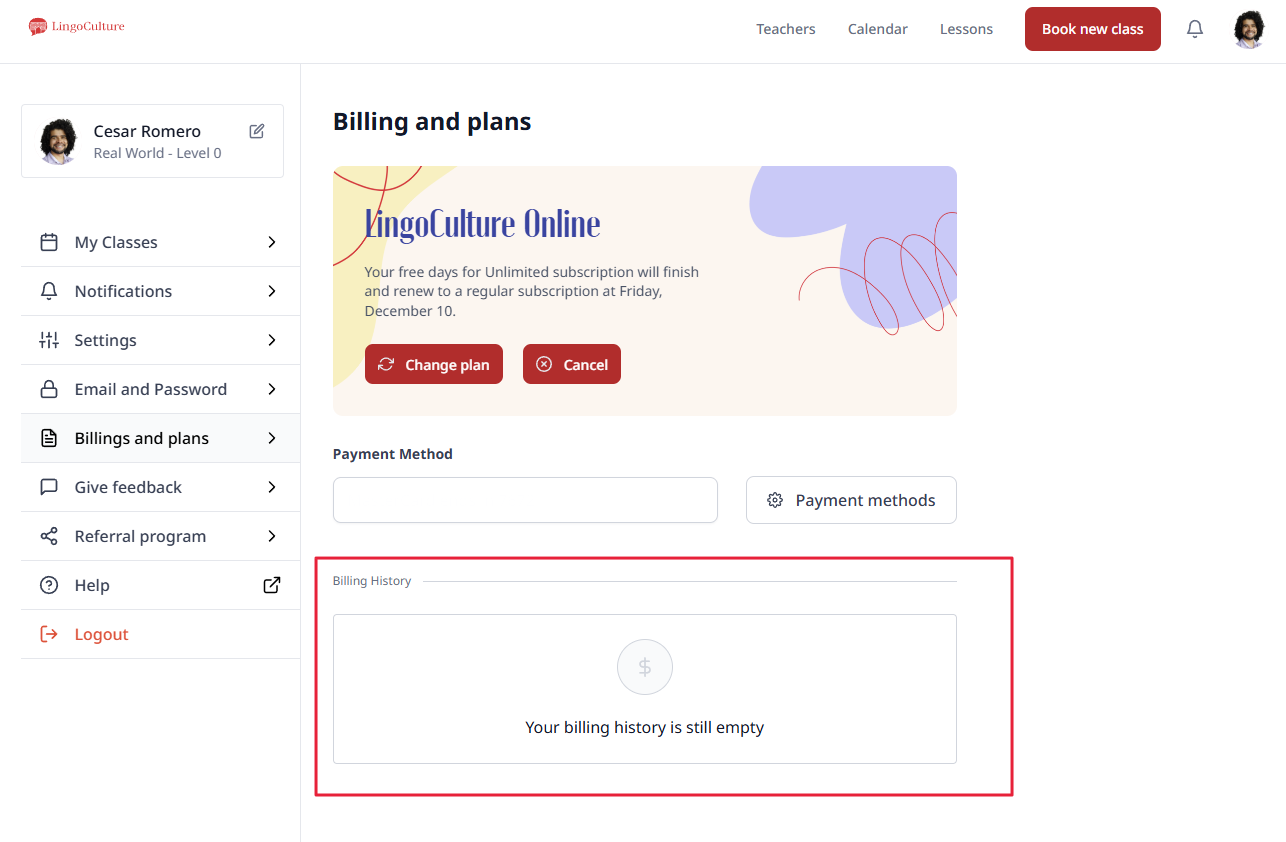
What is in Your Billing History?
-
Date: The day the transaction was processed
-
Amount: The total charged in your selected currency (USD or EUR)
-
Status: Whether the payment was successful or is still pending
Troubleshooting
-
Check for Duplicate Accounts: Ensure you are logged into the same email address used when you first signed up
-
Trial Status: Remember that the initial $7 trial fee and your full membership are separate transactions
-
If a charge appears on your bank statement but not in this history, please reach out to [email protected] with a screenshot of the charge so we can investigate
Still need help?
-
Talk to us: Click the Chat Bubble in the bottom right corner or email bonjour@lingoculture or [email protected].