At LingoCulture, we want your plan to match your learning pace. Whether you are ready to "go unlimited" or need to scale back to a more casual schedule, changing your plan is simple. C'est flexible! (It is flexible!)
How to Change Your Plan Online
-
Log in to your dashboard at web.lingoculture.com
-
Click on your profile icon and select "My Account"
-
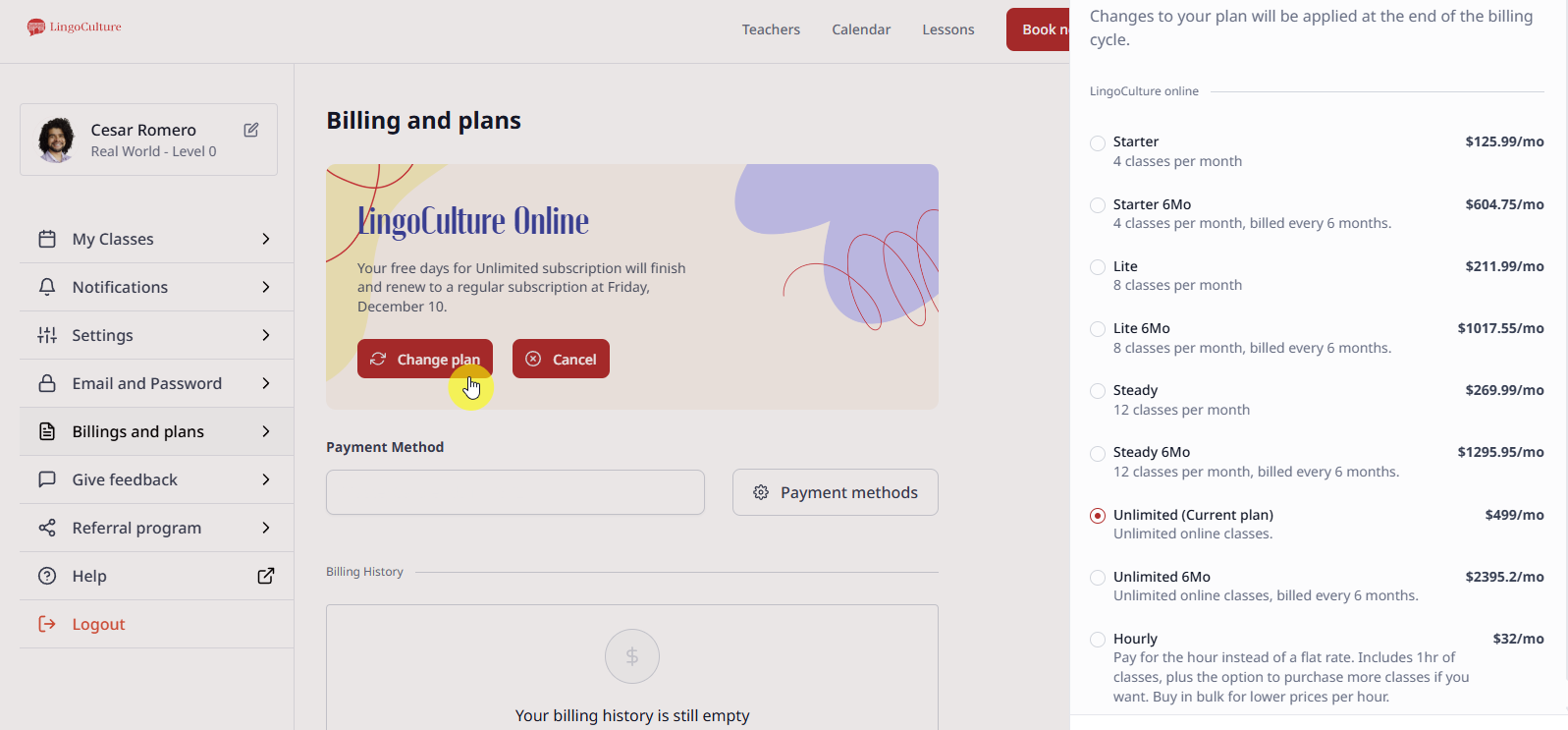
Head to the "Billings and plans" section on the left-hand menu
-
Locate the red "Change plan" button (the first of the three buttons in the center)
-
A sidebar will appear showing all available options, from our Starter plan to LingoCulture Unlimited
Upgrading Mid-Cycle
If you are currently on a smaller plan and find that you want to take more classes immediately, you don't have to wait for your next billing date! Because this requires a pro-rated calculation, please reach out to our support team at [email protected]. Our billing experts will handle this manually to ensure you get immediate access to your new classes.
Downgrading Your Plan
If you decide to move to a plan with fewer classes per month, the change will be applied at the end of your current billing cycle. This ensures you get to use all the classes you have already paid for!
Still need help?
-
Talk to us: Click the Chat Bubble in the bottom right corner or email bonjour@lingoculture or [email protected].