Whether you are just getting started or revisiting your profile later, this is your go-to guide for setting up and updating your personal information. Think of your profile as your learning passport: it makes your journey smoother and more personal!
First Things First: Set Your Timezone
Before you dive into this guide, the actual first step is making sure your timezone is accurate. Without it, your calendar might cause confusion for everyone!
If you haven't done this yet, please check out our "How do I set my timezone?" guide first. We will be right here when you get back!
How to Access Your Profile Settings
-
Log in to your account at web.lingoculture.com
-
Click your profile picture in the top right corner
-
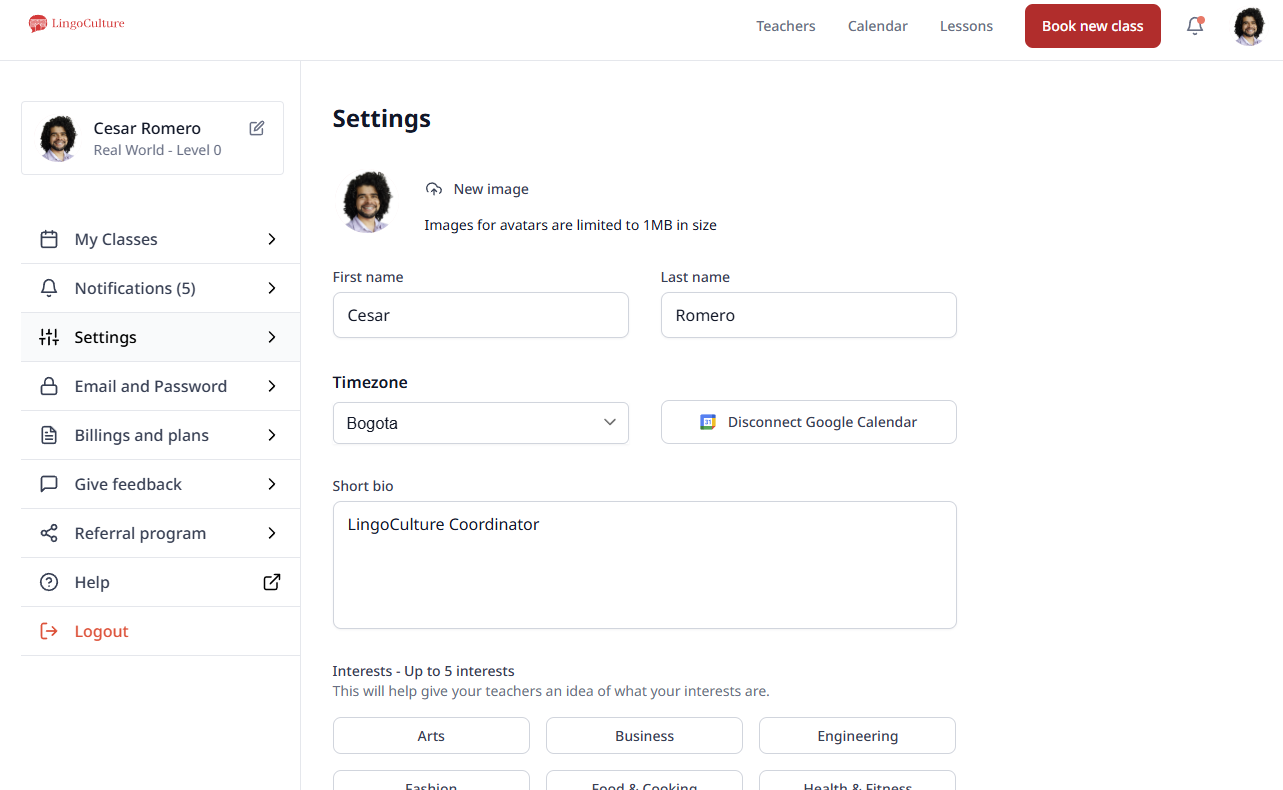
Select the "Settings" section
Here, you will find editable fields for:
-
Profile picture: Upload a clear photo so teachers recognize you easily
-
First and Last Name: Required for all students to ensure professional communication
-
Short Bio: Tell us about your journey (e.g., "I studied French in high school and am picking it back up!")
-
Interests: Select topics like cooking, travel, or fashion to help teachers tailor your conversations
-
Google Calendar integration: Sync your classes with your personal schedule
Why It Matters
-
Better Preparation: If a teacher knows you love travel, they can prepare relevant vocabulary for your session
-
Professionalism: Having a valid first and last name helps our staff support you effectively, as well when you receive one of our certificates this is the name that will be displayed
-
Privacy: Your information is protected and used only to support your learning
Still need help?
-
Talk to us: Click the Chat Bubble in the bottom right corner or email bonjour@lingoculture or [email protected].