Want a summary of what you learned in each class? LingoCulture offers AI-generated notes that capture key vocabulary, corrections, and learning highlights from your lessons. Prenez des notes! (Take notes!)
What Are AI Notes?
AI notes are automatic summaries of your class generated by Zoom's smart transcription feature. After your lesson ends, Zoom analyzes the conversation and creates a written summary including:
-
Key vocabulary you learned or practiced
-
Grammar points your teacher explained
-
Corrections your teacher made during class
-
Topics discussed in conversation
-
Areas to practice before your next lesson
A Note on Class Recordings
As part of our commitment to quality and safety, all LingoCulture classes are recorded. Recordings are stored securely and used exclusively for internal quality control, teacher development, and to ensure a safe learning environment for everyone. They are not shared externally or used for promotional purposes. By signing up, you acknowledge and accept this as part of our Terms and Conditions.
How to Start Receiving AI Notes
AI notes are optional: you won't receive them automatically unless you request them.
Step 1: Ask Your Teacher During Class
Simply say: "I'd like to receive AI notes after our classes. Could you activate that for me?"
Step 2: Your Teacher Activates the Feature
Your teacher will enable AI notes for all your future classes together.
Step 3: Receive Notes After Each Class
-
Zoom sends the AI-generated notes to your teacher
-
Your teacher reviews them
-
Your teacher sends them to you through Chat History on the platform
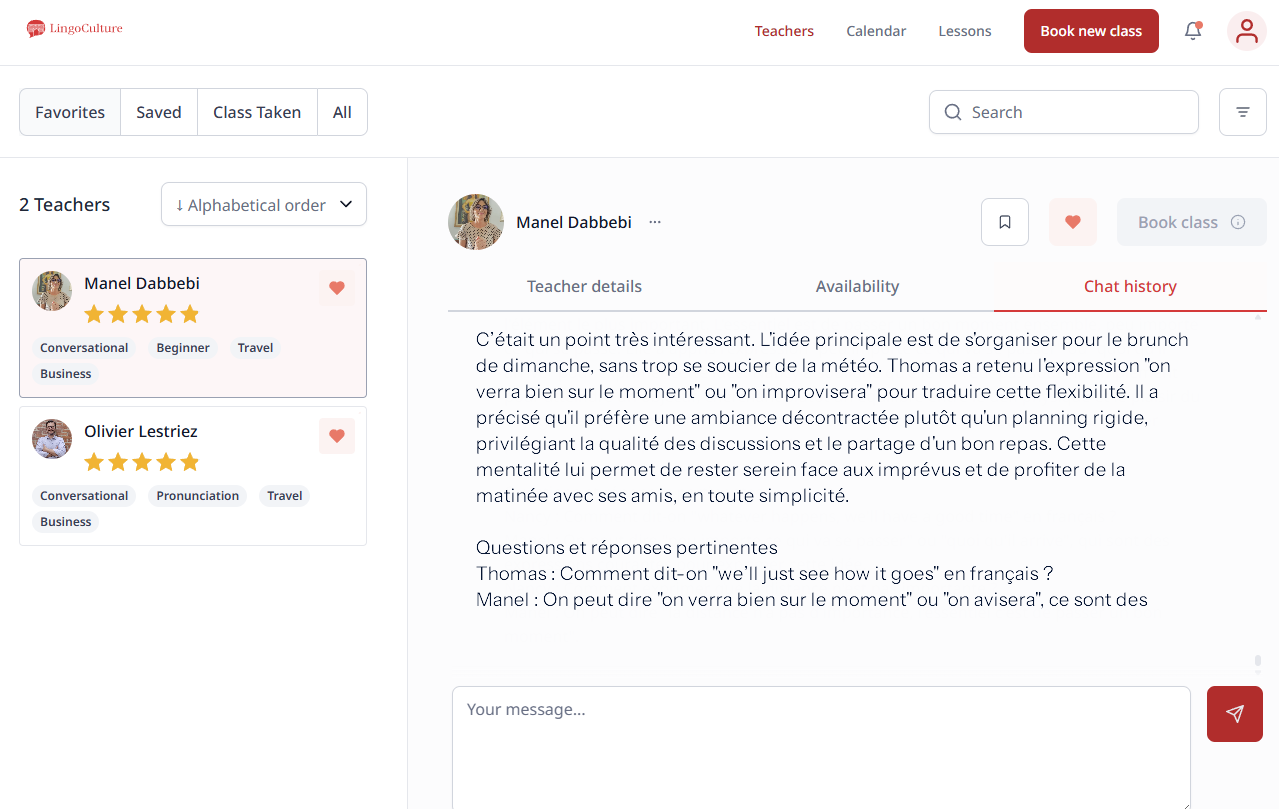
Where to Find Your AI Notes
-
Go to the Teachers tab (top right corner)
-
Click on the teacher you had class with
-
Go to Chat History
-
Look for the AI notes your teacher sent after your class
All your notes will be saved there, organized by teacher. You can review them anytime!
Important Things to Know
-
AI notes are only available for Zoom classes
-
Your teacher must have the Zoom AI feature enabled
-
Notes are sent after class, not during, typically within a few hours
-
Once you request AI notes, your teacher will keep sending them after every class, no need to ask again each time!
-
Changed your mind? Just tell your teacher: "I don't need the AI notes anymore, thanks!"
Common Questions About AI Notes
Q: Do AI notes cost extra?
A: No! They're included as part of your LingoCulture experience at no additional cost.
Q: Can I get AI notes from classes I already took?
A: Unfortunately, no. The feature only works for future classes after you've requested it.
Q: Are the notes private?
A: Yes! They're sent directly to you through Chat History with your teacher. Only you and that teacher can see them.
Q: Will every teacher I work with send me AI notes?
A: You need to request AI notes separately with each teacher. If you try someone new, remember to ask them too!
Still need help?
-
Talk to us: Click the Chat Bubble in the bottom right corner or email bonjour@lingoculture or [email protected].